
All edge services emit structured diagnosis messages into a central panel (Settings → Diagnosis). Each message carries a four-digit code.
| Range | Service | Codes |
|---|---|---|
| 1xxx | MainUI | 1001–1099 |
| 2xxx | UpdateService | 2001–2099 |
| 3xxx | IOLinkMasterProxy | 3001–3099 |
| 4xxx | USBService | 4001–4099 |
| 7xxx | Fleet connection — reported from any service that uses it | 7000–7999 |
| — | DataStore | 1000–2504, see below |
The number alone is not enough. The DataStore brings some 150 codes of its own, and their numbers overlap with those of MainUI and the UpdateService. What settles it is the service name the message appears under in the diagnosis panel, not the digits.
MainUI (1xxx)
| Code | Meaning | Typical action |
|---|---|---|
| 1001 | Update server unreachable | Check the edge’s internet / VPN. |
| 1002 | IDEA4S interface unreachable | Check the IDEA4S-Bridge service (diagnosis detail); restart the edge if needed. |
| 1003 | Netplan apply failed | Re-check the IP config you entered, reboot. |
| 1004 | Config file corrupt | Call a service technician — edge falls back to defaults. |
| 1005 | Docker socket unreachable | Reboot; if it persists, service technician. |
| 1006 | Service URL unreachable | Which URL is shown in the diagnosis detail. |
| 1007 | Container unhealthy | Check that service’s diagnosis tab. |
| 1008 | Docker command failed | Service technician. |
| 1009 | Update signature invalid | Do not install — contact Brinkhaus support. |
| 1010 | Update server key does not match the pinned one | The update server delivered a different signing key from the one the edge knows, without valid proof of a key change. The update was not downloaded; the running version is unchanged. Do not retry — contact Brinkhaus support. |
| 1011 | UpdateService update refused: image from a source that is not allowed | The new version of the UpdateService named a container image from a source this edge does not accept; it was not installed and the current UpdateService keeps running. Contact Brinkhaus support. |
| 1012 | Own HTTPS certificate expires soon or has expired | Install a renewed certificate — see Remote access (HTTPS). |
| 1013 | HTTPS certificate not usable | If the message names your own certificate: the edge uses its edge certificate instead; reinstall or remove yours under Settings → HTTPS certificate. If it names a temporary certificate, a failed renewal or the HTTPS start: the edge retries by itself; if the message stays, call a service technician. |
UpdateService (2xxx)
| Code | Meaning | Typical action |
|---|---|---|
| 2001 | Update directory missing | Service technician. |
| 2002 | Pre-update backup failed | Check disk space, retry. |
| 2003 | docker compose up failed | Check diagnosis detail, possibly perform rollback. |
| 2004 | Post-update health check failed | Update is rolled back automatically — check logs. |
| 2005 | Rollback initiated | Informational — no action needed. |
| 2006 | Rollback succeeded | Informational — edge is back up. |
| 2007 | Rollback failed | Service technician immediately. |
| 2008 | Update signature verification failed | Do not install — contact support. |
| 2009 | Signature check skipped (legacy 1.x update) | Informational — only occurs while migrating 1.x edges; from 2.x on, signature verification is always enforced. |
| 2010 | Update images missing on the device | The message names them: they could not be pulled and are not on the device either, so the update was not started; an edge already running a version returns to it (see 2005–2007). Check the edge’s access to the registry and trigger the update again. |
| 2011 | Update rejected: image from an unaccepted source | The update named a container image from a repository this edge does not accept; nothing was installed and the running version is untouched. Do not retry with the same package — contact support: either the release is wrong or someone tampered with it. |
IOLinkMasterProxy (3xxx)
| Code | Meaning | Typical action |
|---|---|---|
| 3001 | IO-Link master unreachable | Check the LAN cable to the IFM master, reboot the IFM device. |
| 3002 | High error rate while proxying | IFM master or network has issues — check logs. |
| 3003 | HTTP error from IO-Link master | Check the IFM configuration. |
| 3004 | Connection to the IO-Link master relay refused | A host tried to read the IO-Link master and is not permitted to. Intended, unless it is a reader you set up — then add its address to allow_from in the master configuration file on the edge. |
USBService (4xxx)
| Code | Meaning | Typical action |
|---|---|---|
| 4001 | USB mount failed | Re-insert the stick; try a different stick. |
| 4002 | File transfer failed | Re-insert the stick. |
| 4003 | MainUI unreachable | The edge itself has a problem — see codes 1xxx. |
| 4004 | USB detected but no device | Re-insert the stick. |
| 4005 | CSV files pending transfer | Insert a USB stick. |
| 4006 | Container restarting | Informational. |
| 4007 | No USB with files to copy | Informational. |
| 4008 | Last copy succeeded | Informational. |
DataStore
If your edge runs a DataStore, its own codes come on top. The full list is in the DataStore’s own handbook, available from Brinkhaus service; the three that turn up in everyday use are listed here. All three concern retention — how long the edge keeps its measurements. The message text in the diagnosis panel names the data set concerned.
| Code | Meaning | Usual action |
|---|---|---|
| 1513 | The automatic clean-up cannot keep up — more arrives than it clears. | Check the retention limits (DataStore → Settings → Behavior parameters → Retention); if it persists, inform Brinkhaus service. |
| 1517 | Note (not a fault): after an update, the existing data is classified once. | None. On large edges this takes hours; until then the clean-up only clears measurements it has already classified. |
| 1522 | Emergency stop: the edge has halted data recording because a data set reached its emergency level — usually after a size limit was set too low. | Adjust the limit in the DataStore, or wait until the clean-up is done. The message then stays up until a “small restart” in the DataStore interface acknowledges it. |
Where can I see the codes?
In Settings → Diagnosis expand the panel per service to see individual messages with their codes and descriptions:
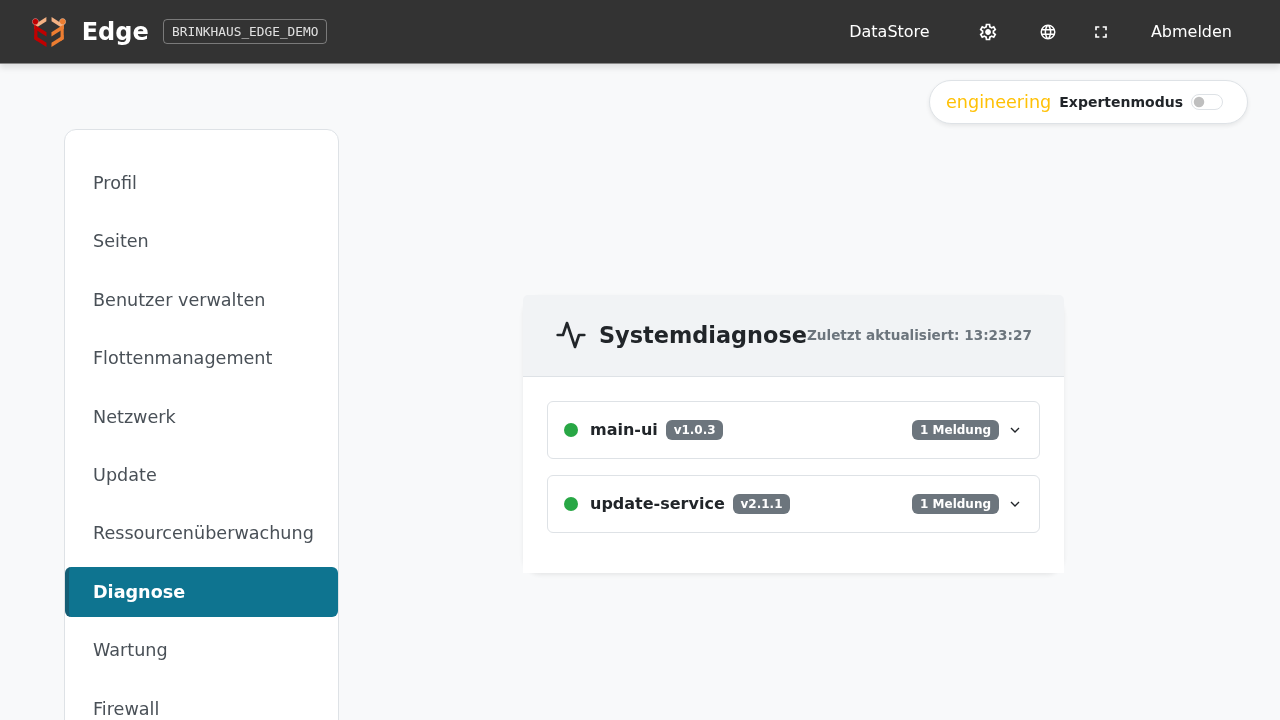
Via the fleet integration the same codes are also visible centrally in the FleetManager — a dedicated explanation page is coming.