
You want to choose which sensor values the IO-Link master actively publishes via MQTT (or delete existing subscriptions). The openXEdge embeds the IFM device’s configuration UI directly — no cable swap, no second tool.
What is embedded here?
Click the IOLink Master Configuration tile on the home page and the openXEdge loads /web/subscribe from the ifm IoT Core firmware of your IO-Link master (example device: AL1304, FW 2.6.x). That is the IFM device’s standard Notification page:
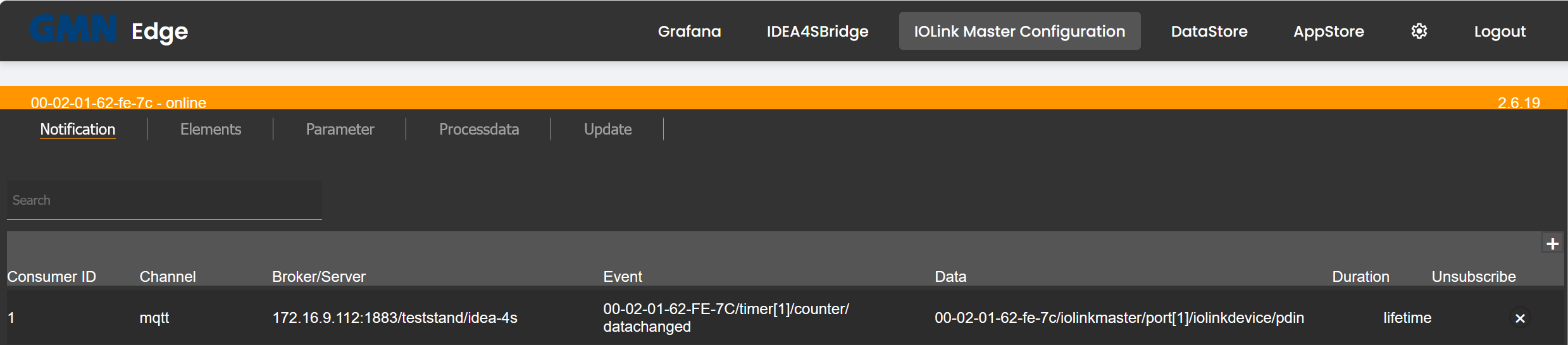
The tabs above (Notification, Elements, Parameter, Processdata, Update) are native ifm-IoT-Core tabs — the openXEdge shows them 1:1; every action affects the IO-Link master directly.
Create an MQTT subscription
On the Notification page click the + in the top-right to add a new row, then per subscription:
| Field | Meaning |
|---|---|
| Channel | Transport — typically mqtt. |
| Broker/Server | Address + port + topic prefix of the MQTT broker. The openXEdge itself runs Mosquitto on port 1883 with no auth. Example: 172.16.9.112:1883/teststand/idea-4s. |
| Event | The event on the master or device that triggers a publish — e.g. 00-02-01-62-FE-7C/timer[1]/counter/datachanged for every tick of an internal timer. |
| Data | Which data points are included — e.g. 00-02-01-62-fe-7c/iolinkmaster/port[1]/iolinkdevice/pdin for process-data-in of the sensor on Port 1. |
| Duration | lifetime (stays until deleted) or a time limit. |
The configuration is stored inside the IFM device, not on the openXEdge. The device keeps the subscriptions across openXEdge reboots; they are part of the “ports in the device” and survive a power cycle.
Delete a subscription
Unsubscribe column → click the ×. The row disappears and the IFM device stops publishing.
Let a system outside the edge read the master
A DataStore that does not run on this edge needs two things to show the sensor as a machine: the live values from the edge’s MQTT broker, and the master itself over HTTP JSON-RPC. The second one is closed by default — the edge relays the master on host port 8082, but only lets through its own UI and the addresses you name.
Add them on the edge, in the settings volume, as
/home/gmn-service/docker/data/web-ui/settings/iolink_master.json:
{
  "host": "172.16.9.110",
  "port": 80,
  "allow_from": ["172.16.0.229"]
}host/port are the master’s address (they may be omitted if it sits at the
factory default 172.16.9.110:80); allow_from takes single addresses or whole
ranges in CIDR form. Then restart the relay:
sudo docker restart docker-iolink-proxy-1. The file survives firmware updates.
The reader is then pointed at <edge address>:8082 instead of the master’s own
address.
The reader also needs the IODD. The edge carries any supplied IODD files for
its own acquisition; a DataStore elsewhere gets nothing from that. Without the
one matching the sensor’s DeviceID it decodes no measurement at all, even
though the data visibly flows — for an IDEA-4S Basic that is the normal case,
because no Basic revision ships with DataStore. Load the same IODD there. Everything not on the list is refused with 403 and reported as
diagnosis code 3004, which names the address that was turned away — so a
missing entry does not look like a dead cable.
One reader at a time. The IO-Link master answers exactly one viewer; an outside reader shares that with this configuration page, the backup and the edge’s own DataStore.
Testing from the edge itself does not work through this port — a request from the edge’s own shell reaches the relay wearing an internal address and is refused, exactly like any other host that is not on the list. That is deliberate. Test from the machine that is meant to read, or use this page.
When do you need this?
- First time you set up an edge: create the subscription for the IDEA-4S sensor once, so data reaches DataStore and Grafana.
- When the Grafana dashboard is empty: check whether the subscription still exists (some IFM firmware updates clear the list). If yes, check the state; if no, recreate it.
- When you want to forward additional signals — e.g. diagnostic values of the IO-Link master itself.
Notes
- The ifm IoT Core UI is served by the master directly. If it doesn’t appear, the master’s LAN or power is usually faulty. The openXEdge reports that in Settings → Diagnosis under
iolink-proxywith code 3001 (see Diagnosis codes). - For exhaustive documentation of the individual IFM fields refer to the ifm IoT Core manual for your master model — the openXEdge docs focus on the parts that concern the edge.