Concept v2
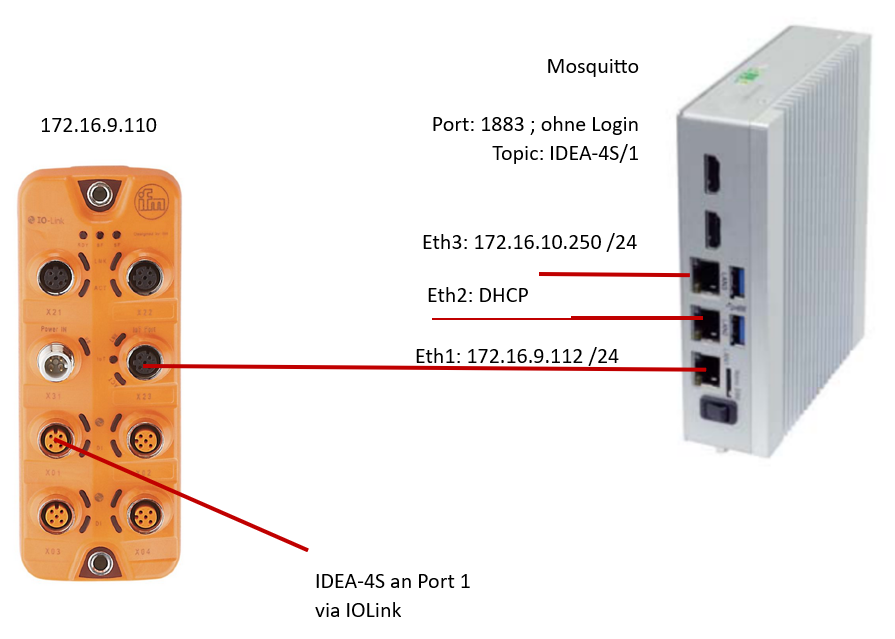
The openXEdge has three LAN ports on the front. Out of the box they are fixed to three distinct roles — once you’ve internalised that, you also know where service personnel plug in and where the sensor bus must terminate.
The three ports
Top to bottom on the device:
| Port | Role | Factory IP |
|---|---|---|
| Eth3 (top) | Service port for Brinkhaus service / IT support. Static, isolated from the office network. | 172.16.10.250/24 |
| Eth2 (middle) | Office network — DHCP client. The edge gets its company IP here, reaches the internet, talks to the FleetManager. | DHCP |
| Eth1 (bottom) | IO-Link master uplink. Static in the master subnet. | 172.16.9.112/24 |
Eth1 is therefore permanently pointed at the IFM IO-Link master — factory default 172.16.9.110. The IDEA-4S sensor sits on Port 1 of that master via IO-Link and emits its values over the IO-Link protocol.
Why three separate networks?
The separation does two things at once:
- Machine bus stays clean — the IO-Link master and its sensor strand live in their own small subnet (
172.16.9.0/24). Traffic there is in the low-kbit range and is not affected by office load. - Office network stays clean — anything that needs the outside world (firmware updates, FleetManager onboarding, browser access from a shop-floor PC) goes exclusively through Eth2.
Data path in short
IDEA-4S (IO-Link)
    │
    ▼
IFM IO-Link master (172.16.9.110)
    │  publishes via MQTT
    ▼
Mosquitto on the edge       port 1883, no auth, topic IDEA-4S/1
    │
    ▼
DataStore  ──→  PostgreSQL  ──→  Grafana
More on visualisation in Grafana dashboards, more on the MQTT subscription in Configure IO-Link master.
Practical consequences
- Bringing a system online: Eth1 to the IO-Link master, Eth2 into the office network with DHCP, Eth3 only when a service technician is on site.
- On-site IDEA-4S work: a service laptop reaches the device through Eth3 (service subnet) or through Eth2 (office side).
- Changing the edge’s IP: only via the UI (see Configure the network) — never via the OS directly, you would break the next update.